Since Apple updates macOS annually, this article intends to provide information to ensure your critical software tools function as smoothly as possible.
It usually takes third party software developers some time to bring their applications up to date in order to be fully compatible with new operating systems (OS). We strongly recommend that you always check with the developers of any critical applications you rely on to be certain they are compatible before upgrading to a new OS.
Since Virtual Drumline is reliant on Kontakt, VDL cannot be considered compatible with a new OS until Native Instruments has had time to test is and release a compatible version of Kontakt. Until that happens, we urge you to hold off on updating very recent OS versions.
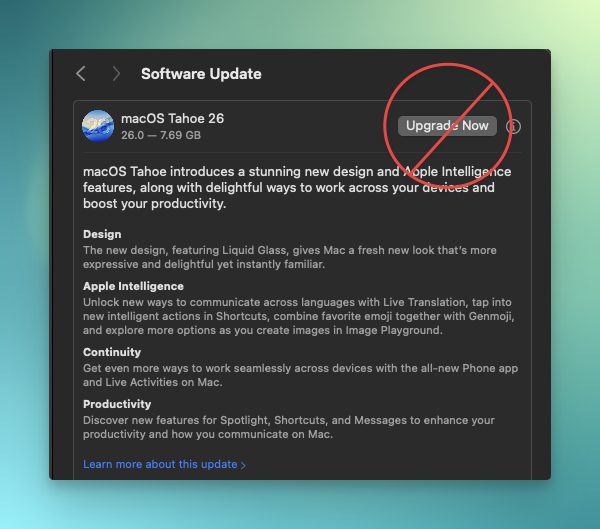
Apple has become more aggressive in the number of notifications it sends you, urging you to update to their latest OS, so it's important to be mindful when you receive such prompts.
It is extremely important to verify that each program you rely on will be compatible with a new OS before you upgrade. See point #2 below for some quick links to check the latest status.
If you are a Mac user, here are some good general tips:
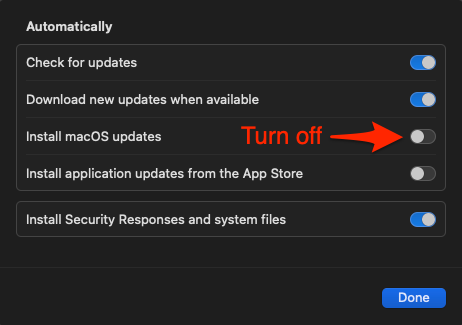
1. Turn off "auto updates" on your mac. Do this at System Settings>General>Software Update.
2. Keep track of the macOS compatibility status with the VDL-related software you rely on.
- Native Instruments info on macOS Kontakt compatibility
- Music notation software compatibility status with macOS and Apple Silicon (courtesy of our friends at Scoring Notes)